The EDUMiLL is a revolutionary system that incorporates technologies from the additive and subtractive manufacturing fields to open the door to a new realm of possibilities and further innovation by making it affordable to include a 3D printer and a robust CNC mill in one package.
MINDS-i Education kits are all made out of the same basic pieces, with helpful step by step instructions. The MINDS-i platform consists of simple beams and connectors that lock together to make a durable chassis.
WebLytics retains the ease-of-use, affordability, application focus and accessibility that defines every OnRobot product. WebLytics installs quickly and is readily expandable and future-proofed for new robots and tools as they become available. The WebLytics server can be deployed on a shop floor’s local network or added to a virtual network that connects to the robot cell. Collected data is stored locally on the WebLytics server and WebLytics’ built-in web server is always accessible from the shop floor network or from anywhere in the world via secure HTTPS connection.
Learn how to properly apply a K9 tourniquet with our comprehensive TacMed™ K9 Tourniquet overview.
Ensuring workplace security is essential in the modern digital era. Comprehensive knowledge of both overall security protocols and IT measures is vital for safeguarding employees, assets, and confidential data. Overlooking security measures can result in theft, fraudulent activities, and data breaches, posing significant risks to both individuals and organizations. This course aims to instruct employees on optimal strategies for upholding workplace security and defending against cyber threats.
Learning Objectives
The primary goal of this course is to teach individuals how to identify security breaches in their workplace. The user will learn how to:
- Identify security breaches
- Respond to security breaches
- Be aware of their surroundings
- Practice proper safety procedures
- Safeguard against digital threats
The Security Hazard Awareness simulation is ideal for employees or supervisors in general industries.
A scaffold serves as a temporary framework enabling workers to carry out tasks at elevated levels. They are essential in construction, maintenance, planned shutdowns, and various other high-altitude work activities.
The United States Bureau of Labor Statistics (BLS) reports that scaffold-related incidents cause approximately 60 fatalities and 4,500 injuries annually. Falls from scaffolds contribute to around 25% of fatal falls from all work surfaces, leading to an estimated 60 deaths each year due to scaffold-related accidents.
Learning Objectives
The primary goal of this course is to teach workers safe work procedures to follow when working on or around scaffolding. Users will learn:
- How to identify common scaffolding hazards
- Preventing accidents on the job site
- The role of the scaffolding competent person
- How to avoid common injuries’ associated with scaffolding
- Protocol for working around scaffolding
The scaffolding awareness simulation is ideal for current and future employees or supervisors who work in or around scaffolding on a construction site.
Annually, thousands of individuals in the US suffer injuries caused by electricity. At times, workers may come across equipment and circuits that are powered or pose a risk of being energized during their tasks. Without adequate precautions, an arc flash incident can occur.
An arc flash, also known as a flashover, is an electrical discharge or explosion arising from a connection through the air to the ground or another voltage phase within an electrical setup. For instance, this happens when a wire comes into contact with an earthed system. Working near or within electrical panels and systems heightens the risk of exposure to an arc flash, necessitating extreme safety measures.
Learning Objectives
The primary goal of this course is to teach workers safe work procedures while performing work activities around electrical areas. The user will learn:
- The proper locking out and tagging out electrical equipment
- How to properly do a Live – Dead – Live check
- Practices that can eliminate or minimize electrical hazards
- The proper use of electrical test equipment
- Electrical fundamentals
- Properly managing arc flash risks
- Electrical safety Personal Protective Equipment (PPE)
The simulation is ideal for personnel working in and around hazardous electrical areas.
Seeking innovative training solutions for the oil and gas sector? Dive into Hard Hat VR, a revolutionary immersive training platform crafted specifically for the high-stakes realm of oil and gas. Step away from outdated methods and embrace Virtual Reality tailored to enhance safety and efficiency in your industry!
Why Hard Hat VR for Oil & Gas?
- Realistic Oilfield Scenarios: Experience training in lifelike oil rigs and refineries without real-world risks.
- Industry-Tailored Interactivity: Engage in hands-on, industry-relevant training for lasting impact.
- Cost-Effective Solutions: Slash training expenses and minimize operational interruptions.
- Enhanced Safety Protocols: Prepare your workforce for real hazards within a controlled VR environment.
Who Benefits?
- Oil and Gas Companies
- HSE (Health, Safety, and Environment) Professionals
- Technical and Vocational Institutes
Maximize Your Gains
- Heightened Training Efficiency
- Elevated Safety Standards on the Field
- Enhanced Knowledge Retention Among Employees
The Smart Automation Certification Alliance (SACA) recently hosted an exclusive Process Control Technical Work Group meeting at Endress+Hauser headquarters in Greenwood, Indiana. The meeting brought together experts in the process control and instrumentation industry to help validate certification standards for process control in areas such as process control systems, process control troubleshooting, and smart process instrumentation.
In this video, SACA Executive Director Jim Wall and Endress+Hauser Director of Workforce Development Nicole Otte discuss the importance of industry experts providing input on the skills and competencies needed for today’s smart manufacturing workforce. Collaboration with industry experts is essential to create nationally-recognized, occupation-driven certifications that will ensure that future workers have the skills employers need most.
According to Wall, “The whole goal of having the standards and certifications program is to help schools and colleges and other training providers develop and expand programs that include these new technologies, so that we get more people with these skills into the workforce.”
Ladder safety is a key aspect of fall prevention. According to the CDC, 81% of fall injuries, which is the leading source of fatalities among construction site workers, involve the use of ladders. As such, it’s important to remember and follow ladder safety best practices. Ladder Training isn’t considered a necessity by law, but the importance is often overlooked. The HSE recommends that anyone using ladders needs to be competent and carrying out officially certified training is one way to do this. Teaching the basics of ladder health and safety can help prevent potential injuries and inform others on how to identify if a ladder is a potential risk.
Learning Objectives
The primary goal of this course is to teach workers safe work procedures to follow when using ladders in a work environment. The user will learn:
- To identify hazards associated with ladder use
- How to select the correct ladder for the job
- How to inspect a ladder for defects
- How to practice proper safety procedures
- To see the consequences of improper actions
The Ladder Safety simulation is ideal for employees or supervisors who work in or around work environments that utilize ladders.
Oakland Community College (OCC), situated in Auburn Hills, MI, stands as one of FANUC America's esteemed 1,500 partner institutions. At OCC, a specialized robotics and automated systems technology program equips students for roles in the realm of industrial automation. The automation lab at OCC houses an extensive array of FANUC robots renowned worldwide for their application in material handling, welding, palletizing, and machine tending across various industries. Graduates from OCC, having acquired certifications or degrees, emerge primed for careers in industries employing robotics and automation technology.
This video spotlights OCC's steadfast dedication to nurturing individuals into adept professionals in advanced automation, paving the way for prosperous career trajectories. Through firsthand accounts from multiple students, viewers gain insights into their educational journey and future aspirations. The central message underscores the demand from employers seeking individuals capable of bridging the skills gap. OCC's program not only supplies skilled workers to meet industry demands but also assists its graduates in securing fulfilling and rewarding career paths.
Pages
-
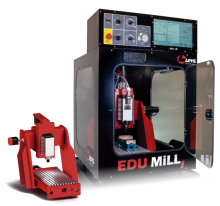 Item Number:EDU-MiLL
 -
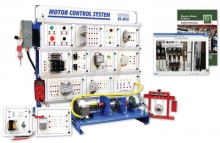 Item Number:85-MT5Amatrol’s Electric Motor Control Learning System (85-MT5) covers electric relay control of AC electric motors found in industrial, commercial, and residential applications. Learners study industry-relevant skills including how to operate, install, design, and troubleshoot AC electric motor control circuits for various applications.
 -
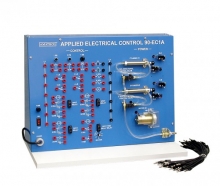 Item Number:90-EC1AThe Applied Electrical Control Learning System (90-EC1-A) teaches learners how to interpret, design, and operate relay control circuits using ladder diagrams. Electrical control is vital in the operation of electric and fluid power actuators and also forms the fundamental building block of automation systems like programmable logic controllers (PLCs), which are programmed using the electrical control schematic method, the ladder diagram.
 -
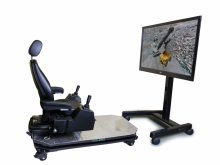 Item Number:ERSThere are eight "Simulation Modules" of increasing difficulty, starting with Controls Familiarization. The final modules combine elements of dipper fill at the rock face, and cab-side or blind-side truck loading. A simulated Mining Truck is built right in, to help teach truck spotting interaction. Key "Performance Indicators" measure how quickly and how carefully the simulated work is performed.
 -
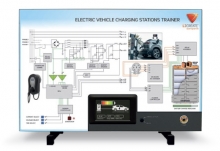 Item Number:743-01This trainer provides students and instructors with the opportunity to demonstrate, investigate and fault-find the circuitry and operation of off-car charging systems.
 -
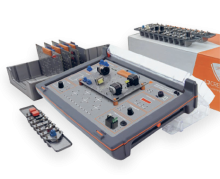 Item Number:730-10 / 730-00Desktop training systems provide very specific instruction and practice in the basic skills that are required by students as they embark on their careers.
 -
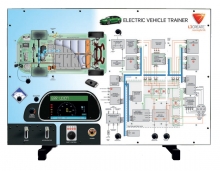 Item Number:740-01LJ Create's Electric Vehicle Systems Panel Trainer provides students and instructors with the opportunity to demonstrate, investigate, and fault-find a simulation of the electrical system of a typical electric vehicle.
 -
 Item Number:810-000Teach the critical safety skill of electrical lock-out/tag-out with DAC Worldwide's Electrical Lock-Out/Tag-Out Training System (Model: 810-000). This hands-on, portable trainer ensures your workforce is prepared to handle hazardous electrical energy safely and effectively.
 -
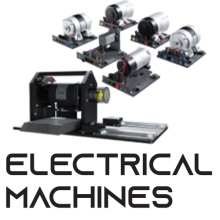 Explore electrical machines, motor control, power conversion, and drivetrain technologies with the Matrix TSL Electrical Machines Training System. A modular, hands-on platform for engineering and technical education.
 -
 Item Number:85-MT7BAmatrol’s Electrical Power Distribution Learning System (85-MT7B) teaches a broad range of electrical advanced manufacturing skills, such as installing, maintaining, and troubleshooting modern power distribution systems that require skills ranging from setting up basic raceways to selecting appropriate over-current protection for sensitive equipment.